
3DS
3DS API Developer Guide
Accept secure card payments with EMV 3D Secure (3DS) authentication, helping merchants meet AusPayNet CNP Fraud Mitigation Framework requirements
Overview: when you need 3DS
3D Secure 2 (3DS) adds cardholder authentication to card-not-present payments. The card issuer assesses the transaction and either approves it silently (frictionless) or asks the cardholder to verify themselves (challenge). When authentication succeeds, liability for a fraud-related chargeback shifts from merchant to the issuer.
Why you would turn this on
In Australia, 3DS is how you meet the card scheme requirements for cardholder authentication and how you keep your card-not-present fraud rate inside the thresholds. Exceeding those thresholds puts you into a remediation process with the acquirer. 3DS is the primary control.
How it works
End-to-end sequence
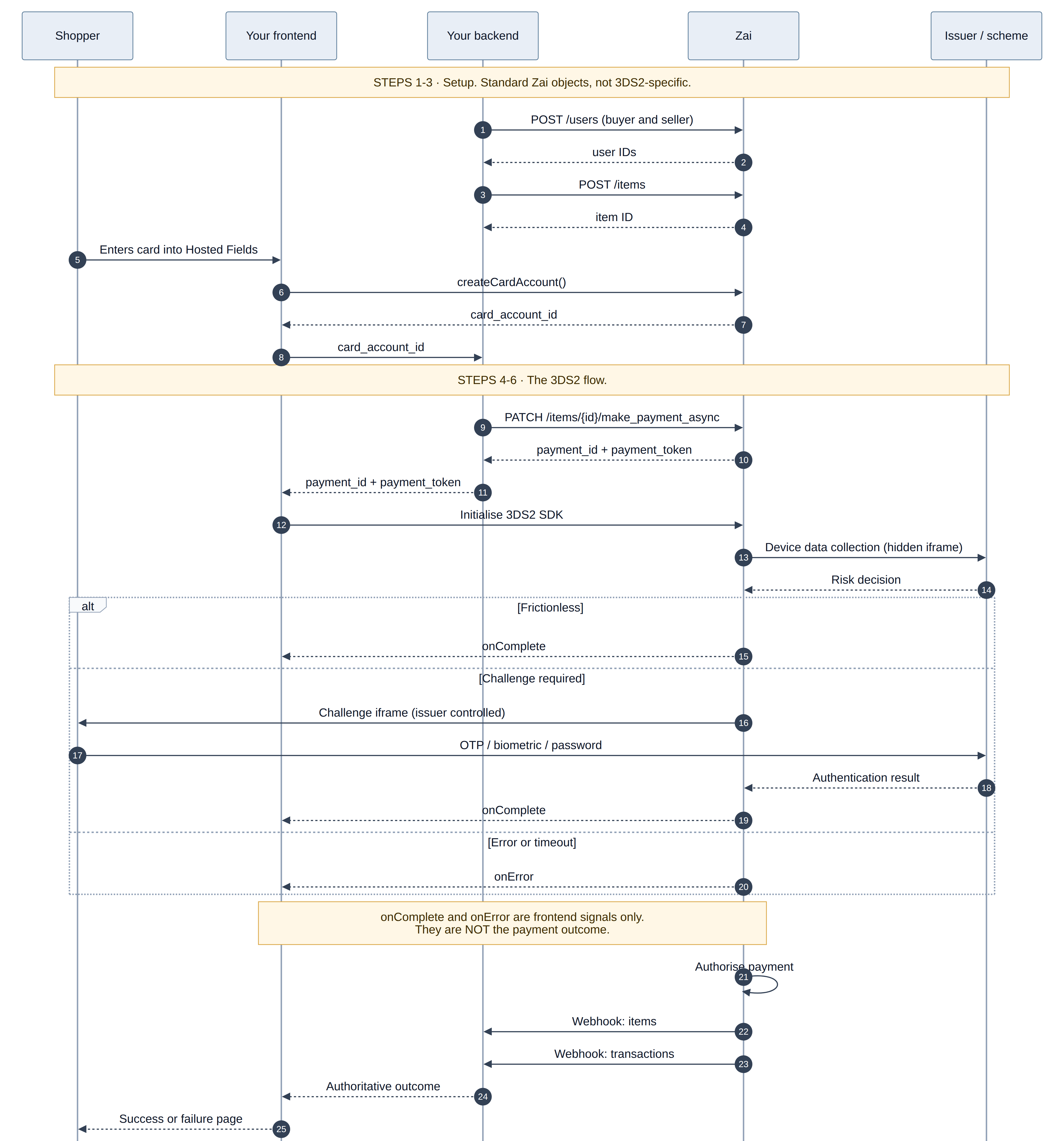
The one rule that matters
onComplete and onError are frontend signals, not payment outcomes.
onComplete fires when the authentication flow finished. The payment can still be declined afterwards for insufficient funds, a velocity rule, or any other authorisation reason.
onError fires when the browser flow broke, which can include a network drop on a payment that succeeded server-side.
Treat both callbacks as "stop showing the spinner and go ask the backend". The authoritative outcome comes from webhooks, described in section 5.
Before you start
You need all of these before writing any code.
| Requirement | How to get it | Reference |
|---|---|---|
| A Zai account with 3DS enabled | Contact your Zai representative. It is not self-serve. | — |
| OAuth2 client credentials | Dashboard | Authentication |
| Sandbox access | dashboard.hellozai.com | — |
Webhooks configured for items | POST /callbacks | Webhooks |
| Buyer and seller users (or create them in step 1) | POST /users | Cards Payin Workflow |
| Cards tokenised through Hosted Fields | assembly.js | Integrating Hosted Fields |
Tokenise cards
Capture card details with Hosted Fields or the Hosted Form. Both keep the card number out of your systems and reduce your PCI DSS scope to SAQ A or SAQ A-EP.
Posting a raw PAN to POST /users/{id}/card_accounts is possible but puts you in full PCI DSS scope. Do not build a new integration that way.
Content Security Policy
If your checkout sets a CSP header, add these before you start testing. Getting this wrong is the most common cause of "the iframe never appears", and it typically only surfaces in your production build.
Content-Security-Policy:
  frame-src   https://*.assemblypay.com https://*.cardinalcommerce.com;
  script-src  https://*.assemblypay.com;
  connect-src https://*.assemblypay.com https://*.promisepay.com;
Integrate in six steps
This section is one working example. Every value it uses is either returned by a previous step or listed in Testing.
The six steps fall into two halves. Steps 1 to 3 are ordinary Zai objects and are the same whether or not you use 3DS, so if you are already taking card payments you have them. Steps 4 to 6 are the 3DS part.
Step 1: Create the buyer and seller users
Every Zai payment moves funds from a buyer to a seller, so both need to exist before you can create an item. If your users already exist, skip to step 2 and use their IDs.
# Buyer
curl -X POST https://test.api.promisepay.com/users \
  -H "Authorization: Bearer {oauth_token}" \
  -H "Content-Type: application/json" \
  -d '{
    "id": "buyer_123",
    "first_name": "John",
    "last_name": "Doe",
    "email": "[email protected]",
    "country": "AUS"
  }'
# Seller
curl -X POST https://test.api.promisepay.com/users \
  -H "Authorization: Bearer {oauth_token}" \
  -H "Content-Type: application/json" \
  -d '{
    "id": "seller_456",
    "first_name": "Jane",
    "last_name": "Smith",
    "email": "[email protected]",
    "country": "AUS"
  }'
Step 2: Create the item
The item is the container that moves funds between the two users. It is what you call make_payment_async against in step 4.
curl -X POST https://test.api.promisepay.com/items \
  -H "Authorization: Bearer {oauth_token}" \
  -H "Content-Type: application/json" \
  -d '{
    "id": "item_789",
    "name": "Product purchase",
    "amount": 5000,
    "payment_type": 2,
    "buyer_id": "buyer_123",
    "seller_id": "seller_456",
    "description": "3DS test payment",
    "currency": "AUD"
  }'
Step 3: Tokenise the card in the browser
<script src="https://hosted-fields.assemblypay.com/assembly.js"></script>
<script>
  const hostedFields = assembly.hostedFields({ environment: "pre-live" });
  hostedFields.createCardAccount({
    token: "HOSTED_FIELDS_TOKEN",
    user_id: "buyer_123"
  })
  .then(function (response) {
    // Send the card account id to your backend. Never send it straight to make_payment_async
    // from the browser: that call needs your OAuth token, which must stay server-side.
    return fetch("/api/pay", {
      method: "POST",
      headers: { "Content-Type": "application/json" },
      body: JSON.stringify({ card_account_id: response.card_accounts.id })
    });
  })
  .catch(function (error) {
    showCardError(error);
  });
</script>
Step 4: Start the payment from your backend
Steps 4 to 6 are the 3DS flow. Everything above this line is standard Zai.
curl -X PATCH https://test.api.promisepay.com/items/item_789/make_payment_async \
  -H "Authorization: Bearer {oauth_token}" \
  -H "Content-Type: application/json" \
  -d '{
    "account_id": "725cc8c0-759b-0138-5d6d-0a58a9feac05",
    "request_three_d_secure": "challenge"
The response contains the item object. Only two fields matter here:
{
  "payment_id": "1000014012533486",
  "payment_token": "sample-token-1234567890",
  "account_id": "725cc8c0-759b-0138-5d6d-0a58a9feac05",
  "items": { "...": "full item object, see the API reference" }
}| Field | What it is | Where it goes |
|---|---|---|
payment_id | Identifier for this payment attempt | Passed to the SDK as paymentId |
payment_token | Short-lived token scoped to this one payment's status | Passed to the SDK as authToken |
Step 5: Run the 3DS flow in the browser
<div id="threeds-container"></div>
<script src="https://hosted-fields.assemblypay.com/assembly-3ds.js"></script>
<script>
  new assembly3DS().initialize({
    authToken: paymentToken,        // payment_token from step 4
    paymentId: paymentId,           // payment_id from step 4
    env: "pre-live",                // "production" in production
    targetElementId: "threeds-container",
    onComplete: function () {
      // Authentication finished. This is NOT the payment outcome.
      confirmWithBackend(paymentId);
    },
    onError: function (error) {
      // The browser flow broke. The payment may still have succeeded server-side.
      console.error("3DS error:", error.message);
      confirmWithBackend(paymentId);
    }
  });
</script>
targetElementId must reference an element that already exists in the DOM. The SDK injects a hidden iframe for device data collection and, if a challenge is triggered, a visible iframe rendered by the issuer. Give the container enough room: 400px by 400px is a reasonable minimum, and it must be usable on mobile.
Step 6. Determining the payment outcome
Webhooks are the source of truth
Register callbacks before you take your first payment:
curl -X POST https://test.api.promisepay.com/callbacks \
  -H "Authorization: Bearer {oauth_token}" \
  -H "Content-Type: application/json" \
  -d '{ "url": "https://your-backend.example.com/webhooks/zai/items", "object_type": "items", "enabled": true }'
Webhooks are not ordered. Compare the payload's updated_at against what you have stored and discard anything older. Make your handler idempotent: the same event can arrive more than once.
Sample Webhooks Responses:
Below are sample webhook payloads for both successful payment events and scheme card declines following a 3DS check:
Successful Payment:
Once a successful payment is done for a transaction after 3DS check, the below webhooks will be received by the customer.
{
            "uuid": "29eade14-2a8f-4e9d-a4ef-c5bc5a9a4b47",
            "hashed_payload": "5cfdac10fb20718b7da68de5f693d060ed5232be58bd9d543f2dbcde8ad7dc9a",
            "webhook_uuid": "924069f1-2cbd-4ed0-a910-96b9c8df15ce",
            "payload": {
                "items": {
                    "amount": 10250,
                    "batch_state": "successful",
                    "buyer_country": "AUS",
                    "buyer_email": "[email protected]",
                    "buyer_fees": 0,
                    "buyer_name": "Testbed Buyer",
                    "buyer_url": "",
                    "chargedback_amount": 0,
                    "created_at": "2026-10-13T00:25:02.082Z",
                    "credit_card_fee": 0,
                    "currency": "AUD",
                    "custom_descriptor": null,
                    "deposit_reference": "100014244017164",
                    "description": null,
                    "direct_debit_fee": 0,
                    "due_date": null,
                    "dynamic_descriptor": "ASM*QA WP Prelive",
                    "id": "tb-item-mv5xv84y-9748",
                    "invoice_url": null,
                    "links": {
                        "batch_transactions": "/items/tb-item-mv5xv84y-9748/batch_transactions",
                        "bpay_details": "/items/tb-item-mv5xv84y-9748/bpay_details",
                        "buyers": "/items/tb-item-mv5xv84y-9748/buyers",
                        "fees": "/items/tb-item-mv5xv84y-9748/fees",
                        "self": "/items/tb-item-mv5xv84y-9748",
                        "sellers": "/items/tb-item-mv5xv84y-9748/sellers",
                        "status": "/items/tb-item-mv5xv84y-9748/status",
                        "transactions": "/items/tb-item-mv5xv84y-9748/transactions",
                        "wire_details": "/items/tb-item-mv5xv84y-9748/wire_details"
                    },
                    "name": "Testbed item tb-item-mv5xv84y-9748",
                    "net_amount": 10250,
                    "payment_credit_card_enabled": true,
                    "payment_direct_debit_enabled": true,
                    "payment_method": "credit card",
                    "payment_type_id": 2,
                    "payments": [
                        {
                            "account_id": "cdbbb403-2667-43f2-949d-389e6ad08d2f",
                            "amount": 10250,
                            "created_at": "2026-10-13T00:25:06.687Z",
                            "payment_id": "ab6bf844-bf63-4c25-bf32-e4dd270bb55d",
                            "status": "completed"
                        }
                    ],
                    "payout_descriptor": null,
                    "paypal_fee": 0,
                    "pending_release_amount": 0,
                    "promisepay_fee": 388,
                    "refunded_amount": 0,
                    "related": {
                        "buyers": "tb-buyer-mv5xv84y",
                        "sellers": "tb-seller-mv5xv84y"
                    },
                    "released_amount": 10250,
                    "remaining_amount": 0,
                    "requested_release_amount": 0,
                    "seller_country": "AUS",
                    "seller_email": "[email protected]",
                    "seller_fees": 0,
                    "seller_name": "Testbed Seller",
                    "seller_url": "",
                    "state": "completed",
                    "status": 22500,
                    "total_amount": 10250,
                    "total_outstanding": 0,
                    "updated_at": "2026-10-13T00:26:23.713Z"
                }
            },
            "object_type": "items",
            "request_responses": [
                {
                    "response_code": 404,
                    "message": "{\"success\":false,\"error\":{\"message\":\"Token \\\"3d8f1a69-4cb3-450d-bc0d-e7ea5b596d49\\\" not found\",\"id\":\"\"}}",
                    "created_at": "2026-10-13T00:26:27.274755574Z"
                }
            ],
            "updated_at": "2026-10-13T00:26:27.274854711Z",
            "created_at": "2026-10-13T00:26:23.713217Z",
            "object_id": "tb-item-mv5xv84y-9748"
        },
Payment Declines:
Card decline errors are not returned synchronously in the API response or displayed to end users during the 3DS flow. If a payment is declined by the card scheme during post-authentication processing, failure details are delivered asynchronously via webhooks.
{
    "uuid": "f2f34979-0378-4e40-860e-782b83043c89",
    "hashed_payload": "594fa5e69142866ec21760eb6d8a62c584343dc4ded2b858d644a617aadbec86",
    "webhook_uuid": "aecaf4ae-eeae-4e8d-ab52-8e951c8fb70e",
    "payload": {
        "items": {
            "amount": 100000,
            "batch_state": "cancelled",
            "buyer_country": "AUS",
            "buyer_email": "[email protected]",
            "buyer_fees": 0,
            "buyer_name": "Prod Validation",
            "buyer_url": "",
            "chargedback_amount": 0,
            "created_at": "2026-10-05T23:49:40.291Z",
            "credit_card_fee": 0,
            "currency": "AUD",
            "custom_descriptor": null,
            "deposit_reference": "100014998591919",
            "description": null,
            "direct_debit_fee": 0,
            "due_date": null,
            "dynamic_descriptor": "100014998591919",
            "id": "prodtest-muvwimul-6143",
            "invoice_url": null,
            "links": {
                "batch_transactions": "/items/prodtest-muvwimul-6143/batch_transactions",
                "bpay_details": "/items/prodtest-muvwimul-6143/bpay_details",
                "buyers": "/items/prodtest-muvwimul-6143/buyers",
                "fees": "/items/prodtest-muvwimul-6143/fees",
                "self": "/items/prodtest-muvwimul-6143",
                "sellers": "/items/prodtest-muvwimul-6143/sellers",
                "status": "/items/prodtest-muvwimul-6143/status",
                "transactions": "/items/prodtest-muvwimul-6143/transactions",
                "wire_details": "/items/prodtest-muvwimul-6143/wire_details"
            },
            "name": "3DS production validation prodtest-muvwimul-6143",
            "net_amount": 100000,
            "payment_credit_card_enabled": true,
            "payment_direct_debit_enabled": true,
            "payment_method": "pending",
            "payment_type_id": 2,
            "payments": [
                {
                    "account_id": "53bf9471-fbcd-409a-8ec7-2447574480ea",
                    "amount": 100000,
                    "created_at": "2026-10-05T23:49:44.226Z",
                    "errors": {
                        "base": [
                            "Credit card payment failed: Insufficient Funds"
                        ],
                        "provider_response_code": [
                            "51"
                        ],
                        "provider_response_message": [
                            "Insufficient funds"
                        ]
                    },
                    "payment_id": "6ce65ece-739e-45e4-ab7e-4596f6105343",
                    "status": "payment_failed"
                }
            ],
            "payout_descriptor": null,
            "paypal_fee": 0,
            "pending_release_amount": 0,
            "promisepay_fee": 0,
            "refunded_amount": 0,
            "related": {
                "buyers": "prodtest-buyer-muvwimul",
                "sellers": "prodtest-seller-muvwimul"
            },
            "released_amount": 0,
            "remaining_amount": 100000,
            "requested_release_amount": 0,
            "seller_country": "AUS",
            "seller_email": "[email protected]",
            "seller_fees": 0,
            "seller_name": "Prod Seller",
            "seller_url": "",
            "state": "pending",
            "status": 22000,
            "total_amount": 100000,
            "total_outstanding": 100000,
            "updated_at": "2026-10-05T23:50:03.513Z"
        }
    },
For a full list of possible decline codes and their descriptions, refer to the Card Decline Errors page
Testing
Test cards
| Scenario | Visa | Mastercard | Amex |
|---|---|---|---|
| Frictionless success | 4000000000002701 | 5200000000002235 | 340000000002708 |
| Frictionless failure | 4000000000002925 | 5200000000002276 | 340000000002096 |
| Challenge | 4000000000002503 | 5200000000002151 | 340000000002534 |
| Challenge Failed | 4000000000002370 | 5200000000002490 | 340000000002237 |
| Attempts stand-in | 4000000000002719 | 5200000000002482 | 340000000002872 |
| Authentication unavailable | 4000000000002313 | 5200000000002268 | 340000000002922 |
| Rejected | 4000000000002537 | 5200000000002185 | 340000000002062 |
| Not available on lookup | 4000000000002990 | 5200000000002409 | 340000000002468 |
| Error on lookup | 4000000000002446 | 5200000000002037 | 340000000002732 |
| Timeout on lookup | 4000000000002354 | 5200000000002326 | 340000000002047 |
Test plan
- Frictionless success end to end, including both webhooks landing.
- Forced challenge, passed, on desktop and on a real mobile browser.
- Forced challenge, abandoned. Verify your timeout handling and that you confirm server-side before showing failure.
- Each remaining test card, asserting against the scenario.
- Webhook failure and replay. Kill your endpoint, confirm retry behaviour, confirm idempotency.
- Out-of-order webhooks. Confirm your updated_at comparison holds.
- CSP verification against your production CSP header, not a relaxed dev one.
- Retry after failure.
Going live
Testing & Validation
- All test scenarios validated in sandbox
- Error handling implemented for all scenarios
- Webhook endpoint tested and secured
- UI/UX optimized for challenge flows
- Mobile browser compatibility verified
- Timeout handling tested
Monitoring & Operations
- Logging implemented for debugging
- Error tracking and alerting configured
- Payment success/failure rates monitored
- Customer support processes updated
- Documentation and runbooks created
Security & Compliance
- PCI DSS requirements reviewed
- Security headers configured (CSP, HTTPS)
- Data retention policies defined
- Incident response procedures documented
Support
Getting Help
- Documentation: developer.hellozai.com
- Support Email: [email protected]
- Dashboard: dashboard.hellozai.com
- Status Page: Monitor API status and incidents
Troubleshooting
The iframe never appears. Almost always CSP. Check the browser console for a blocked frame and compare against section 3. Second most likely cause: targetElementId points at an element that does not exist yet.
Authentication always times out. Check payment_token has not expired and that connect-src allows the Zai API host.
Challenge does not work on mobile. Ensure is set and that your container is not inside a fixed-height element that clips the iframe.
Can I style the challenge screen? No. The issuer renders and controls it.
Concurrent payments. Each payment needs its own payment_id and payment_token. Use a separate SDK instance per payment.
The shopper refreshed the page mid-challenge. The payment will timeout. Implement page refresh detection and guide users to restart the payment process.
Updated about 15 hours ago